|
|
|
|
|
|

對比C# Parallel.ForEach()與foreach()速度快慢
作者:admin 時間:2023-6-5 14:46:30 瀏覽:foreach 循環
C# 中的foreach循環在單個線程上運行,并且處理一個接一個地按順序進行。foreach循環是 C# 的一項基本功能,從 C# 1.0 開始提供。在大多數情況下,它的執行速度比 Parallel.Foreach慢。
Parallel.ForEach 循環
C# 中的 Parallel.ForEach 循環在多個線程上運行,處理以并行方式進行。Parallel.ForEach 循環不是 C# 的基本功能,它在 C# 4.0 及更高版本中可用。在 C# 4.0 之前我們不能使用它。在大多數情況下,它的執行速度比 foreach 快。要使用 Parallel.ForEach 循環,我們需要在 using 指令中導入System.Threading.Tasks命名空間。
但是你非常了解你的應用程序,并且可以決定要使用哪一個。
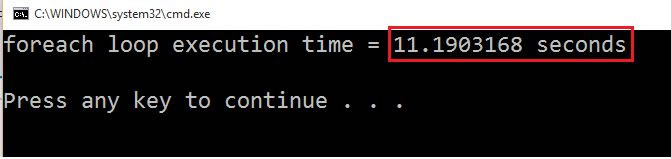
我給出了 2 個示例,在第一個示例中,傳統的 foreach 循環比 Parallel.ForEach 循環更快,而在第二個示例中,傳統的 foreach 循環與 Parallel.ForEach 相比非常慢。
示例 1: Parallel.ForEach 循環比傳統的 foreach 循環慢。
List<string> fruits = new List<string>();
  fruits.Add("Apple");
  fruits.Add("Banana");
  fruits.Add("Bilberry");
  fruits.Add("Blackberry");
  fruits.Add("Blackcurrant");
  fruits.Add("Blueberry");
  fruits.Add("Cherry");
  fruits.Add("Coconut");
  fruits.Add("Cranberry");
  fruits.Add("Date");
  fruits.Add("Fig");
  fruits.Add("Grape");
  fruits.Add("Guava");
  fruits.Add("Jack-fruit");
  fruits.Add("Kiwi fruit");
  fruits.Add("Lemon");
  fruits.Add("Lime");
  fruits.Add("Lychee");
  fruits.Add("Mango");
  fruits.Add("Melon");
  fruits.Add("Olive");
  fruits.Add("Orange");
  fruits.Add("Papaya");
  fruits.Add("Plum");
  fruits.Add("Pineapple");
  fruits.Add("Pomegranate");

  Console.WriteLine("Printing list using foreach loop\n");

  var stopWatch = Stopwatch.StartNew();
  foreach (string fruit in fruits)
  {
      Console.WriteLine("Fruit Name: {0}, Thread Id= {1}", fruit, Thread.CurrentThread.ManagedThreadId);
  }
  Console.WriteLine("foreach loop execution time = {0} seconds\n", stopWatch.Elapsed.TotalSeconds);
  Console.WriteLine("Printing list using Parallel.ForEach");


  stopWatch = Stopwatch.StartNew();
  Parallel.ForEach(fruits, fruit =>
  {
      Console.WriteLine("Fruit Name: {0}, Thread Id= {1}", fruit, Thread.CurrentThread.ManagedThreadId);

  }
  );
  Console.WriteLine("Parallel.ForEach() execution time = {0} seconds", stopWatch.Elapsed.TotalSeconds);
  Console.Read();
輸出
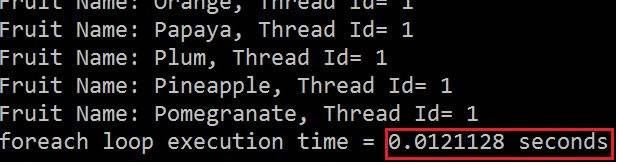
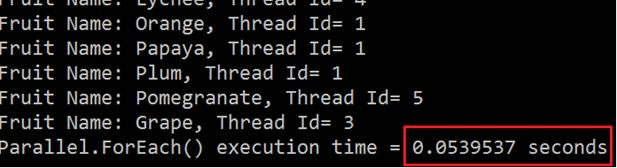
示例 2:Parallel.ForEach 循環比傳統的 foreach 循環更快。
傳統的foreach
var stopWatch = Stopwatch.StartNew();
PointF firstLocation = new PointF(10 f, 10 f);
PointF secondLocation = new PointF(10 f, 50 f);
foreach(string file in Directory.GetFiles(@ "D:\Images"))
{
    Bitmap bitmap = (Bitmap) Image.FromFile(file);
    using(Graphics graphics = Graphics.FromImage(bitmap))
    {
        using(Font arialFont = new Font("Arial", 10))
        {
            graphics.DrawString("Banketeshvar", arialFont, Brushes.Blue, firstLocation);
            graphics.DrawString("Narayan", arialFont, Brushes.Red, secondLocation);
        }
    }
    bitmap.Save(Path.GetDirectoryName(file) + "Foreachloop" + "\\" + Path.GetFileNameWithoutExtension(file) + Guid.NewGuid()
        .ToString() + ".jpg");
}
Console.WriteLine("foreach loop execution time = {0} seconds\n", stopWatch.Elapsed.TotalSeconds);
輸出
Parallel.ForEach
var stopWatch = Stopwatch.StartNew();
PointF firstLocation = new PointF(10 f, 10 f);
PointF secondLocation = new PointF(10 f, 50 f);
Parallel.ForEach(Directory.GetFiles(@ "D:\Images"), file =>
{
    Bitmap bitmap = (Bitmap) Image.FromFile(file);
    using(Graphics graphics = Graphics.FromImage(bitmap))
    {
        using(Font arialFont = new Font("Arial", 10))
        {
            graphics.DrawString("Banketeshvar", arialFont, Brushes.Blue, firstLocation);
            graphics.DrawString("Narayan", arialFont, Brushes.Red, secondLocation);
        }
    }
    bitmap.Save(Path.GetDirectoryName(file) + "Parallel" + "\\" + Path.GetFileNameWithoutExtension(file) + Guid.NewGuid()
        .ToString() + ".jpg");
});
Console.WriteLine("Parallel.ForEach() execution time = {0} seconds", stopWatch.Elapsed.TotalSeconds);
Console.Read();
輸出

結論
為了測試上述代碼的性能,我在這兩種情況下都使用了大約 150 張圖像。
你可以看到,如果你在 foreach 循環內執行任何批量任務,那么 Parallel.ForEach 非常快,因此你可以使用 Parallel.ForEach。
Parallel.ForEach循環的工作方式類似于Parallel.For循環。循環對源集合進行分區,并根據系統環境在多個線程上安排工作。系統上的處理器越多,并行方法運行得越快。對于某些源集合,順序循環可能更快,具體取決于源的大小和循環執行的工作類型。
如果你只是在循環內迭代并執行非常小的任務,那么請使用傳統的for 循環。
相關文章
- C# .NET使用OleDb讀取Excel數據的一個范例
- C# .NET訪問OLEDB或StreamReader讀取Excel(.xls/.xlsx/.csv)文件
- C# CSV解析器TinyCsvParser使用示例:自定義映射
- C# CSV解析器TinyCsvParser使用示例:映射數組
- C# CSV解析器TinyCsvParser使用示例:解析枚舉
- C# CSV解析器TinyCsvParser使用示例:解析自定義格式
- TinyCsvParser - 使用C#解析CSV數據
- C# .NET fastCSV : 小巧快速、符合標準的CSV讀寫器
- 11示例教你用C# .NET CsvHelper讀寫CSV文件(2)
- 11示例教你用C# .NET CsvHelper讀寫CSV文件(1)
- C# .NET使用CsvHelper讀寫CSV文件,快速又易用
- 用EPPlus在C# .NET中讀取Excel文件非常簡單【案例】
- C#連接字符串6種方法速度比較:StringBuilder/Format/Join/Concat等
- 5方面比較C# ArrayList和List的異同及使用建議
- [實踐]使用BenchmarkDotNet對.NET代碼進行基準測試