|
|
|
|
|
|

使用jQuery、CSS3自定義文件輸入框(File Input)
作者:admin 時間:2021-9-8 15:40:37 瀏覽:我們都知道文件輸入框(File Input)在自定義方面非常有限,本教程將指導你完成構建 jQuery 插件的過程,使用jQuery、CSS3自定義文件輸入框(File Input)。
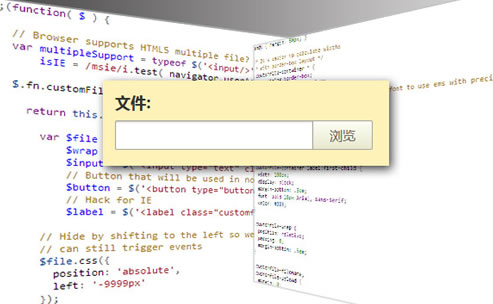
自定義控件介紹
要構建自定義替換,我們需要一個簡單的標記結構:
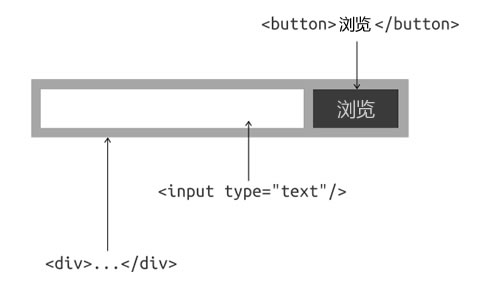
單擊“瀏覽”按鈕將在原始文件輸入上觸發“單擊”事件。選擇文件后,原始輸入會觸發“更改”事件,我們將通過訪問原始值來設置輸入的值。
實現方法
html
我們打開一個 HTML 文件并添加一個容器和一個帶有標簽的文件輸入框(File Input):
<div class="customfile-container">

  <label>文件: </label>

  <input type="file" id="file" name="myfiles[]" multiple />

</div>
還要確保給它一個id和一個數組名稱,這樣myfiles[]服務器就可以檢索所有帶有 IE 回退的文件名。
jQuery
接下來構建一個基本的 jQuery 代碼結構:
;(function( $ ) {

  $.fn.customFile = function() {

    return this.each(function() {

      var $file = $(this).addClass('customfile'); // the original file input

      // code here

    });

  };

}( jQuery ));
最后,在標記中調用函數:
<script>$('input[type=file]').customFile()</script>現在讓我們創建替換所需的元素。IE瀏覽器是防止當輸入被觸發外部,所以我們將使用一個被檢索的文件名嚴格的安全措施label的替代button。通過觸發標簽上的事件,我們可以解決這個問題。
var $wrap = $('<div class="customfile-wrap">'),
    $input = $('<input type="text" class="customfile-filename" />'),
    $button = $('<button type="button" class="customfile-upload">瀏覽</button>');
$label = $('<label class="customfile-upload" for="'+ $file[0].id +'">瀏覽</label>');type="button"需要該屬性以保持一致性,以防止某些瀏覽器提交表單。
接下來,讓我們“擺脫”原始輸入。與其隱藏它,不如讓我們通過將它向左移動來從視口中移除它,這樣即使它不可見,我們仍然可以使用它;如果輸入實際上是隱藏的,這對于觸發可能有問題的事件很有用。
$file.css({
  position: 'absolute',
  left: '-9999px'
});
最后,讓我們將新元素附加到 DOM:
$wrap.insertAfter( $file ).append( $file, $input, ( isIE ? $label : $button ) );
自定義CSS外觀
現在讓我們為它添加一些樣式:
.customfile-container * {
  box-sizing:border-box;
  -moz-box-sizing:border-box;
  -webkit-box-sizing:border-box;
  font: normal 15px 微軟雅黑;
}

.customfile-container {
  width: 300px;
  background: #FFF2B8;
  padding: 1em;
  margin: 0 auto;
}

.customfile-container label:first-child {
  width: 100px;
  display: block;
  margin-bottom: .5em;
  font: bold 18px Arial, sans-serif;
  color: #333;
}

.customfile-wrap {
  position: relative;
  padding: 0;
  margin-bottom: .5em;
}

.customfile-filename,
.customfile-upload {
  margin: 0;
  padding: 0;
}

.customfile-filename {
  width: 230px;
  padding: .4em .5em;
  border: 1px solid #A8A49D;
  border-radius: 2px 0 0 2px;
  box-shadow: inset 0 1px 2px rgba(0,0,0,.2);
}
.customfile-filename:focus {
  outline: none;
}
.customfile-upload:hover {
  background: #fafafa;
  box-shadow: 0 0 2px rgba(0,0,0,.2);
}
至此,你應該在瀏覽器中看到這樣的結果。
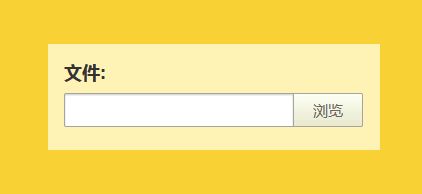
繼續并自定義 CSS 以創建你自己的外觀。
您可能對以下文章也感興趣
標簽: File-Input 上傳文件 文件上傳按鈕
x