|
|
|
|
|
|

漂亮的左側二級導航菜單(伸縮式)【演示/源碼下載】
作者:admin 時間:2022-3-3 18:27:12 瀏覽:本文介紹一個伸縮式的左側二級導航菜單設計。默認顯示一級菜單,點擊菜單時顯示其子菜單。
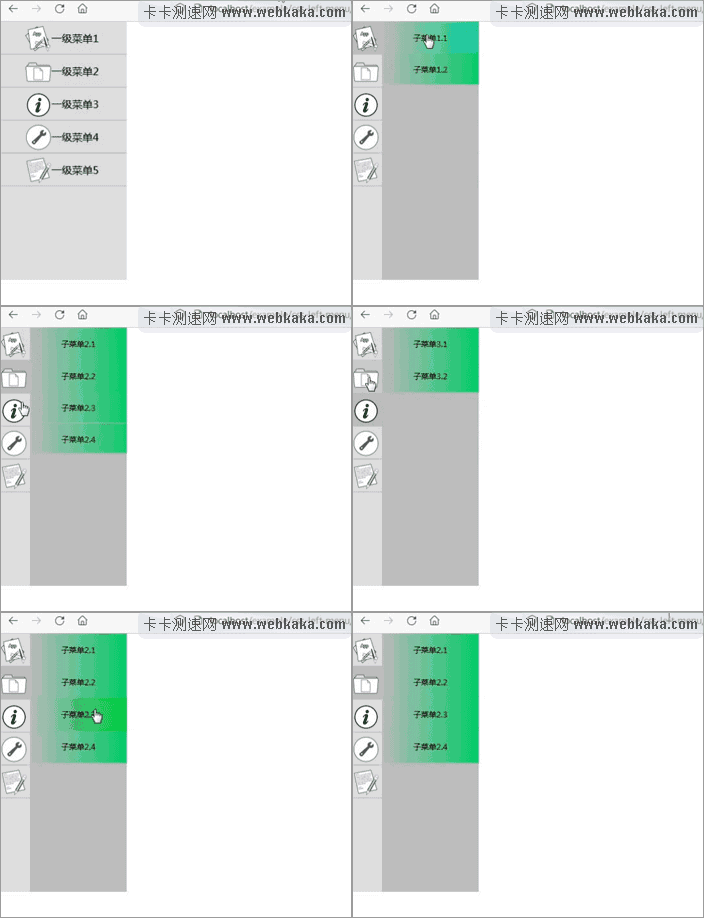
本菜單使用了CSS3+jQuery來實現。
HTML
<div class="sidebar-menu">
    <input type="checkbox" name="menu-first-group" id="menu-first-group">
    <ul class="menu-first">
        <label for="menu-first-1" id="menu-first-1-label"><img src="1.png">一級菜單1</label>
        <label for="menu-first-2" id="menu-first-2-label"><img src="2.png">一級菜單2</label>
        <label for="menu-first-3" id="menu-first-3-label"><img src="3.png">一級菜單3</label>
        <label for="menu-first-4" id="menu-first-4-label"><img src="4.png">一級菜單4</label>
        <label for="menu-first-5" id="menu-first-5-label"><img src="5.png">一級菜單5</label>
    </ul>
    <div class="menu-second">
        <input type="checkbox" name="menu-first" id="menu-first-1" />
        <ul>
            <li class="menu-second-item"><a>子菜單1.1</a></li>
            <li class="menu-second-item"><a>子菜單1.2</a></li>
        </ul>
        <input type="checkbox" name="menu-first" id="menu-first-2" />
        <ul>
            <li class="menu-second-item"><a>子菜單2.1</a></li>
            <li class="menu-second-item"><a>子菜單2.2</a></li>
            <li class="menu-second-item"><a>子菜單2.3</a></li>
            <li class="menu-second-item"><a>子菜單2.4</a></li>
        </ul>
        <input type="checkbox" name="menu-first" id="menu-first-3" />
        <ul>
            <li class="menu-second-item"><a>子菜單3.1</a></li>
            <li class="menu-second-item"><a>子菜單3.2</a></li>
        </ul>
        <input type="checkbox" name="menu-first" id="menu-first-4" />
        <ul>
            <li class="menu-second-item"><a>子菜單4.1</a></li>
            <li class="menu-second-item"><a>子菜單4.2</a></li>
            <li class="menu-second-item"><a>子菜單4.3</a></li>
            <li class="menu-second-item"><a>子菜單4.4</a></li>
            <li class="menu-second-item"><a>子菜單4.5</a></li>
            <li class="menu-second-item"><a>子菜單4.6</a></li>
        </ul>
        <input type="checkbox" name="menu-first" id="menu-first-5" />
        <ul>
            <li class="menu-second-item"><a>子菜單5.1</a></li>
            <li class="menu-second-item"><a>子菜單5.2</a></li>
            <li class="menu-second-item"><a>子菜單5.3</a></li>
        </ul>
    </div>
</div>
菜單盒子(導航區域)是一個DIV,其class值是sidebar-menu。
你會發現有很多個INPUT標簽type=checkbox的復選框,這是顯示一級或其子菜單的判斷標識。你還會發現每個INPUT標簽后面都跟著一個UL容器,UL容器裝的是一級菜單或子菜單內容。INPUT標簽永遠都是不可見的,其CSS屬性display:none,它的作用是,當INPUT標簽的checked屬性為true時,緊跟其后的UL容器便顯示出來,而其他的UL容器便隱藏起來,而顯示或隱藏是通過點擊菜單來觸發,通過Javascript編程來實現。
class值為menu-first的UL容器是一級菜單,class值是menu-second的UL容器是二級菜單。
一級菜單label標簽的for屬性值比如menu-first-1,對應二級菜單中INPUT標簽的id值,通過該id值來關聯父子菜單。二級菜單里的INPUT標簽,name屬性值都是menu-first。li列表標簽的class值都是menu-second-item。
如何新增或減少菜單項目
二級菜單項的新增或減少非常簡單,在實例HTML代碼里自己想要的位置新增或減少一個li標簽即可。
一級菜單的項目標簽是label,所以要減少一個一級菜單項目很簡單,直接在實例HTML代碼里刪除一個label標簽即可。
如果想新增一個一級菜單項目,你需要在合適的位置添加幾行HTML代碼。
1、添加一個label標簽,這是一級菜單。
<label for="menu-first-1" id="menu-first-1-label"><img src="1.png">一級菜單1</label>
<label for="menu-first-2" id="menu-first-2-label"><img src="2.png">一級菜單2</label>
<label for="menu-first-3" id="menu-first-3-label"><img src="3.png">一級菜單3</label>
<label for="menu-first-4" id="menu-first-4-label"><img src="4.png">一級菜單4</label>
<label for="menu-first-5" id="menu-first-5-label"><img src="5.png">一級菜單5</label>
<!-- 下面一行為新增行,注意數字要遞增,這里是6 //-->
<label for="menu-first-6" id="menu-first-6-label"><img src="6.png">一級菜單6</label>
2、添加一個二級菜單INPUT標簽和UL標簽,這是其子菜單。
<input type="checkbox" name="menu-first" id="menu-first-5" />
<ul>
<li class="menu-second-item"><a>子菜單5.1</a></li>
<li class="menu-second-item"><a>子菜單5.2</a></li>
<li class="menu-second-item"><a>子菜單5.3</a></li>
</ul>
<!-- 新增下面代碼,注意input的id值要跟新增的一級菜單的for屬性值一致 //-->
<input type="checkbox" name="menu-first" id="menu-first-6" />
<ul>
<li class="menu-second-item"><a>子菜單6.1</a></li>
<li class="menu-second-item"><a>子菜單6.2</a></li>
</ul>
3、新增CSS代碼
/*二級菜單項延遲翻轉*/
.menu-second > input:checked + ul > li:nth-child(1) {
-webkit-transition-delay: 0ms;
-moz-transition-delay: 0ms;
-ms-transition-delay: 0ms;
-o-transition-delay: 0ms;
transition-delay: 0ms;
}
... ...
... ...
... ...
.menu-second > input:checked + ul > li:nth-child(5) {
-webkit-transition-delay: 400ms;
-moz-transition-delay: 400ms;
-ms-transition-delay: 400ms;
-o-transition-delay: 400ms;
transition-delay: 400ms;
}
<!--
新增如下代碼,注意數字的遞增,
這里是nth-child(6), delay值是500ms
//-->
.menu-second > input:checked + ul > li:nth-child(6) {
-webkit-transition-delay: 500ms;
-moz-transition-delay: 500ms;
-ms-transition-delay: 500ms;
-o-transition-delay: 500ms;
transition-delay: 500ms;
}
通過以上三處改動,便可新增了一個一級菜單項了。
CSS
/*菜單導航區域*/
.sidebar-menu{
    width: 200px;
    height: 400px;
    display: inline-block;
    vertical-align: top;
}
.sidebar-menu input{
    display: none;
}

/*一級菜單組*/
.menu-first{
    width: 100%;
    height: 100%;
    background-color: #ddd;
    float: left;

    transition:width 0.6s;
    -moz-transition:width 0.6s;
    -webkit-transition:width 0.6s;
    -o-transition:width 0.6s;
}
.menu-first img{
    width: 40px;
    height: 40px;
    vertical-align: middle;
}
.menu-first > label{
    color: #000;
    background-color: #ddd;
    border-bottom: 1px solid #bbb;
    height:50px;
    line-height:50px;
    text-align: center;
    cursor: pointer;
    display: block;
    overflow: hidden;

    transition:background-color 0.6s;
    -moz-transition:background-color 0.6s;
    -webkit-transition:background-color 0.6s;
    -o-transition:background-color 0.6s;
    -ms-transition:background-color 0.6s;
}
.menu-first > label:hover{
    background-color: #bbb;
}
.menu-first-selected{
    background-color: #bbb !important;
}
/*一級菜單組縮進*/
#menu-first-group:checked + ul{
    width: 25%;
}

/*二級菜單區域*/
.menu-second{
    vertical-align: top;
    height: 100%;
    background-color: #bbb;
    overflow: hidden;
}
/*二級菜單組*/
.menu-second > ul{
    -webkit-perspective: 300px;
    -moz-perspective: 300px;
    -ms-perspective: 300px;
    -o-perspective: 300px;
    perspective: 300px;
}
/*二級菜單項*/
.menu-second > ul > li{
    height: 0px;
    opacity: 0;
    overflow: hidden;

    transform: rotateY(180deg);
    -moz-transform: rotateY(180deg);
    -webkit-transform: rotateY(180deg);
    -o-transform: rotateY(180deg);
    -ms-transform: rotateY(180deg);

    transition:opacity 1s,height 1s,transform ease-in-out 0.3s;
    -moz-transition:opacity 1s,height 1s,-moz-transform ease-in-out 0.3s;
    -webkit-transition:opacity 1s,height 1s,-webkit-transform ease-in-out 0.3s;
    -o-transition:opacity 1s,height 1s,-o-transform ease-in-out 0.3s;
    -ms-transition:opacity 1s,-ms-transform ease-in-out 0.3s;
}
.menu-second > input:checked + ul > li{
    height: 50px;
    opacity: 1;

    transform: rotateY(0deg);
    -moz-transform: rotateY(0deg);
    -webkit-transform: rotateY(0deg);
    -o-transform: rotateY(0deg);
    -ms-transform: rotateY(0deg);
}

/*二級菜單項*/
.menu-second-item > a{
    color: #000;
    height:50px;
    line-height:50px;
    border-left: 0px solid #bbb;
    border-right: 0px solid #00cc66;

    background:-webkit-gradient(linear, 0% 0%, 100% 0%,from(#bbb), to(#00cc66));
    background:-moz-linear-gradient(left,#bbb,#00cc66);
    background:-ms-linear-gradient(left, #bbb,#00cc66);
    background: -o-linear-gradient(left, #bbb,#00cc66);

    font-size: 12px;
    text-align:center;
    display: block;

    transition:border 0.5s;
    -moz-transition:border 0.5s;
    -webkit-transition:border 0.5s;
    -o-transition:border 0.5s;
    -ms-transition:border 0.5s;
}
.menu-second-item > a:hover{
animation: hover-color 2s infinite;
}

@keyframes hover-color {
    0% {
        background:-webkit-gradient(linear, 0% 0%, 100% 0%,from(#bbb), to(#00cc00));
        background:-moz-linear-gradient(left,#bbb,#00cc00);
        background:-ms-linear-gradient(left, #bbb,#00cc00);
        background: -o-linear-gradient(left, #bbb,#00cc00);
    }
    50% {
        background:-webkit-gradient(linear, 0% 0%, 100% 0%,from(#bbb), to(#00cc99));
        background:-moz-linear-gradient(left,#bbb,#00cc99);
        background:-ms-linear-gradient(left, #bbb,#00cc99);
        background: -o-linear-gradient(left, #bbb,#00cc99);
    }
    100% {
        background:-webkit-gradient(linear, 0% 0%, 100% 0%,from(#bbb), to(#00cc00));
        background:-moz-linear-gradient(left,#bbb,#00cc00);
        background:-ms-linear-gradient(left, #bbb,#00cc00);
        background: -o-linear-gradient(left, #bbb,#00cc00);
    }
}


/*二級菜單項延遲翻轉*/
.menu-second > input:checked + ul > li:nth-child(1) {
    -webkit-transition-delay: 0ms;
    -moz-transition-delay: 0ms;
    -ms-transition-delay: 0ms;
    -o-transition-delay: 0ms;
    transition-delay: 0ms;
}
.menu-second > input:checked + ul > li:nth-child(2) {
    -webkit-transition-delay: 100ms;
    -moz-transition-delay: 100ms;
    -ms-transition-delay: 100ms;
    -o-transition-delay: 100ms;
    transition-delay: 100ms;
}
.menu-second > input:checked + ul > li:nth-child(3) {
    -webkit-transition-delay: 200ms;
    -moz-transition-delay: 200ms;
    -ms-transition-delay: 200ms;
    -o-transition-delay: 200ms;
    transition-delay: 200ms;
}
.menu-second > input:checked + ul > li:nth-child(4) {
    -webkit-transition-delay: 300ms;
    -moz-transition-delay: 300ms;
    -ms-transition-delay: 300ms;
    -o-transition-delay: 300ms;
    transition-delay: 300ms;
}
.menu-second > input:checked + ul > li:nth-child(5) {
    -webkit-transition-delay: 400ms;
    -moz-transition-delay: 400ms;
    -ms-transition-delay: 400ms;
    -o-transition-delay: 400ms;
    transition-delay: 400ms;
}
.menu-second > input:checked + ul > li:nth-child(6) {
    -webkit-transition-delay: 500ms;
    -moz-transition-delay: 500ms;
    -ms-transition-delay: 500ms;
    -o-transition-delay: 500ms;
    transition-delay: 500ms;
}
.sidebar-menu{} 是菜單導航區域,設置區域的高和寬。
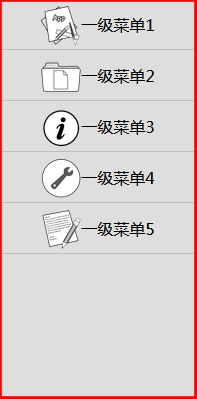
.menu-first{} 是一級菜單組,設置一級菜單組高、寬、背景顏色等屬性。.menu-first img{} 是設置一級菜單的圖片css屬性(高、寬等)。
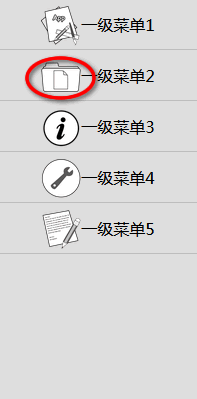
#menu-first-group:checked + ul{} 設置一級菜單組縮進的樣式(寬度)。
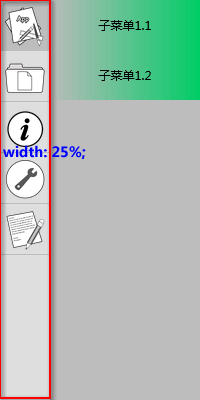
.menu-second{} 是設置二級菜單區域樣式(高度:100%、背景顏色等)。
.menu-second > ul{} 是設置二級菜單組樣式,這里設置了perspective屬性值。
perspective屬性定義 3D 元素距視圖的距離,以像素計。該屬性允許您改變 3D 元素查看 3D 元素的視圖。
當為元素定義perspective屬性時,其子元素會獲得透視效果,而不是元素本身。
注釋:perspective屬性只影響 3D 轉換元素。
.menu-second > ul > li{} 是設置二級菜單項的樣式。這里我們可以試一試改變transform和transition的屬性值,使用自己喜歡的過渡效果。
transform屬性向元素應用 2D 或 3D 轉換。該屬性允許我們對元素進行旋轉、縮放、移動或傾斜。
transition用于設置四個過渡屬性:transition-propertytransition-durationtransition-timing-functiontransition-delay
注釋:請始終設置transition-duration屬性,否則時長為 0,就不會產生過渡效果。
Javascript
本實例用到少量的jQuery代碼。
在編寫jQuery程序前,需要引用jQuery庫文件。
<script src="jquery-3.2.1.min.js"></script>
$("input:checkbox[name=menu-first]").click(function() {});
$("input:checkbox[name=menu-first]").change(function()
{
    var flag = $(this).prop("checked");
    $("input:checkbox[name=menu-first]").prop("checked", false);
    $("#menu-first-group").prop("checked", flag);
    $(this).prop("checked", flag);
    if (!flag)
    {
        $(".menu-first label").removeClass("menu-first-selected");
    }
});
$(".menu-first label").click(function()
{
    $(".menu-first label").removeClass("menu-first-selected");
    $(this).addClass("menu-first-selected");
});
$(window).load(function()
{
    $("input:checkbox[name=menu-first]").prop("checked", false);
    $("#menu-first-group").prop("checked", true);
    $("#menu-first-2").prop("checked", true);
    $("#menu-first-2-label").addClass("menu-first-selected");
});
$(window).load(function(){...} 設置菜單初始狀態。
前面對HTML代碼的解釋中,說到INPUT復選框checked屬性值(true或false)是顯示一級或子菜單的判斷標識。
$("input:checkbox[name=menu-first]").prop("checked", false); 設置子菜單關聯的INPUT復選框checked屬性為false,意思是隱藏所有子菜單。
$("#menu-first-group").prop("checked", true); 設置一級菜單關聯的INPUT復選框checked屬性為true,意思是默認顯示一級菜單。
您可能對以下文章也感興趣