|
|
|
|
|
|

CSS隱藏元素的10種方法之:縮小尺寸
作者:admin 時間:2022-11-2 11:38:37 瀏覽:在前面文章我們介紹了可以通過使用::after偽元素隱藏元素,本文將繼續介紹另一種CSS隱藏元素的方法:縮小尺寸。
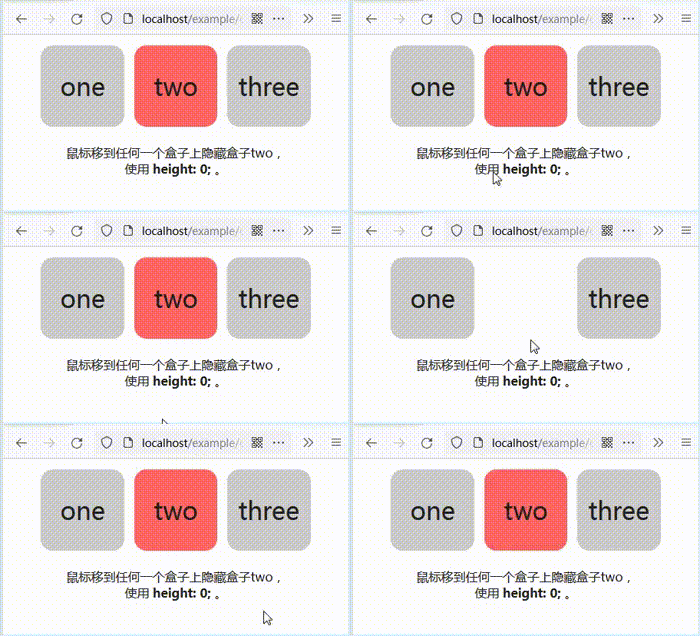
實例
HTML
<ol class="hide" tabindex="0">
  <li>one</li>
  <li class="hide-item">two</li>
  <li>three</li>
</ol>

<p>鼠標移到任何一個盒子上隱藏盒子two,<br>使用 <b>height: 0;</b> 。</p>
CSS
/* hide element */
.hide:hover .hide-item,
.hide:focus .hide-item {
  height: 0;
  padding: 0;
  overflow: hidden;
}

/* other styles */
body {
  font-family: sans-serif;
  font-size: 100%;
  color: #222;
  background-color: #fff;
}

p {
  text-align: center;
}

.hide {
  display: flex;
  justify-content: center;
  list-style-type: none;
  padding: 0;
  margin: 0;
}

.hide > * {
  flex: 0 0 25%;
  font-size: 2em;
  text-align: center;
  padding: 1em 0;
  margin: 0.2em;
  background-color: #ccc;
  border-radius: 0.5em;
  user-select: none;
}

.hide-item {
  background-color: #f66;
  cursor: pointer;
}
代碼解釋
可以通過使用width、height、padding和border-width、font-size 或最小化元素的尺寸來隱藏元素。可能還需要使用overflow: hidden;以確保內容不會溢出。
有趣的動畫效果是可能的,但使用transform的性能明顯更好。
| 度量標準 | 影響 |
|---|---|
| 瀏覽器支持 | 非常好 |
| 可訪問性 | 內容仍在閱讀 |
| 布局受影響? | 是的 |
| 渲染要求 | 布局 |
| 表現 | 較差的 |
| 動畫幀可能嗎? | 是的 |
| 隱藏時可觸發事件嗎? | 不 |
相關文章
相關文章
- CSS隱藏元素的10種方法之:使用::after偽元素
- CSS隱藏元素的10種方法之:使用position屬性
- CSS隱藏元素的10種方法之:使用display
- CSS隱藏元素的10種方法之:使用visibility
- CSS隱藏元素的10種方法之:使用clip-path
- CSS隱藏元素的10種方法之:使用transform
- 如何使用CSS在鼠標懸停時縮放圖像
- CSS隱藏元素的10種方法之:color Alpha 透明度
- CSS隱藏元素的10種方法之:opacity和filter: opacity()
- CSS Grid 和 CSS Flexbox 的區別
- CSS+JS實現的顏色漸變可拖動滑塊
- 詳細介紹CSS+SVG創建圓圈/圓環動畫
- 三種在CSS中排除(不選擇)第一個子標簽的方法
- [實例]純 CSS SVG 畫圓/圓環/圓弧動畫
- [示例]如何使用CSS將文本環繞在圖像周圍
x