|
|
|
|
|
|

在JS中檢查數組是否存在或為空的兩種方法[示例]
作者:admin 時間:2022-6-1 17:9:5 瀏覽:在 JavaScript 中檢查數組是否存在或為空,本文將通過兩種方法來進行介紹,每種方法都有詳細示例演示。
方法一:使用 Array.isArray() 方法和 array.length 屬性
可以通過 Array.isArray() 方法檢查數組是否真的是一個數組,是否存在。如果作為參數傳遞的 Object 是數組,則此方法返回 true。如果數組未定義或為空,它還會檢查大小寫。
可以使用 array.length 屬性檢查數組是否為空。此屬性返回數組中元素的數量。如果數字大于 0,則計算結果為 true。
該方法和屬性都可以與 AND(&&) 運算符一起使用,以確定數組是否存在且不為空。
句法:
Array.isArray(emptyArray) && emptyArray.length
例子:
<!DOCTYPE html>
<html>

<head>
    <title> 檢查一個數組是否為空或存在 </title>
</head>

<body>
    <h1 style="color: green">
WebKaka.com
</h1> <b>
檢查一個數組是否為空或存在
</b>
    <p style="border-left:3px solid #ccc;width:300px;background:#f1f1f1;padding:10px;">emptyArray = []
        <br> nonExistantArray = undefined
        <br> fineArray = [1, 2, 3, 4, 5]</p>
    <br>
    <p>輸出:</p>
    <p> <span style="float:left;">emptyArray:</span> <span class="output-empty" style="float:left;width:80px;height:22px;border-bottom:1px solid #666;padding-left:10px;"></span> </p>
    <br>
    <p> <span style="float:left;">nonExistantArray:</span> <span class="output-non" style="float:left;width:80px;height:22px;border-bottom:1px solid #666;padding-left:10px;"></span> </p>
    <br>
    <p> <span style="float:left;">fineArray:</span> <span class="output-ok" style="float:left;width:80px;height:22px;border-bottom:1px solid #666;padding-left:10px;"></span> </p>
    <br>
    <br>
    <p> 點擊按鈕檢查數組是否存在和非空 </p>
    <button onclick="checkArray()"> 檢查數組 </button>
    <script type="text/javascript">
    function checkArray() {
        let emptyArray = [];
        let nonExistantArray = undefined;
        let fineArray = [1, 2, 3, 4, 5];
        if(Array.isArray(emptyArray) && emptyArray.length) output = true;
        else output = false;
        document.querySelector('.output-empty').textContent = output;
        if(Array.isArray(nonExistantArray) && nonExistantArray.length) output = true;
        else output = false;
        document.querySelector('.output-non').textContent = output;
        if(Array.isArray(fineArray) && fineArray.length) output = true;
        else output = false;
        document.querySelector('.output-ok').textContent = output;
    }
    </script>
</body>

</html>
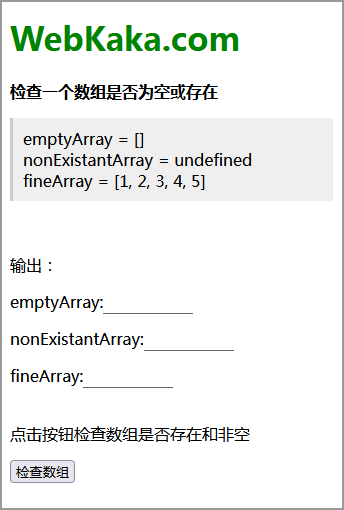
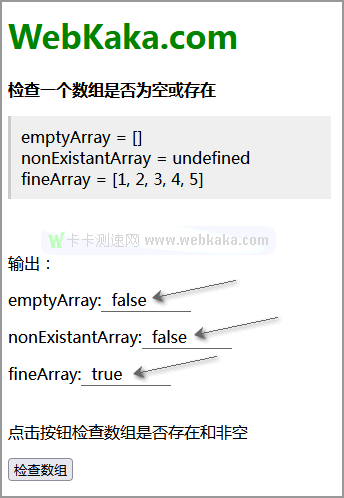
輸出:
◆ 點擊按鈕前
◆ 點擊按鈕后
方法2:檢查數組的類型和長度
可以通過typeof運算符檢查數組的類型是否為“undefined”來檢查數組是否存在。還檢查數組是否為“null”。這兩件事驗證了數組是否存在。
可以使用 array.length 屬性檢查數組是否為空。通過檢查屬性是否存在,可以確定它是一個數組,通過檢查返回的長度是否大于0,可以確定該數組不為空。
然后可以將這些屬性與 AND(&&) 運算符一起使用,以確定數組是否存在且不為空。
句法:
typeof emptyArray != "undefined" && emptyArray != null && emptyArray.length != null
&& emptyArray.length > 0
例子:
<!DOCTYPE html>
<html>

<head>
    <title> 檢查一個數組是否為空或存在 </title>
</head>

<body>
    <h1 style="color: green">
WebKaka.com
</h1> <b>
檢查一個數組是否為空或存在
</b>
    <p style="border-left:3px solid #ccc;width:300px;background:#f1f1f1;padding:10px;">emptyArray = []
        <br> nonExistantArray = undefined
        <br> fineArray = [1, 2, 3, 4, 5]</p>
    <br>
    <p>輸出:</p>
    <p> <span style="float:left;">emptyArray:</span> <span class="output-empty" style="float:left;width:80px;height:22px;border-bottom:1px solid #666;padding-left:10px;"></span> </p>
    <br>
    <p> <span style="float:left;">nonExistantArray:</span> <span class="output-non" style="float:left;width:80px;height:22px;border-bottom:1px solid #666;padding-left:10px;"></span> </p>
    <br>
    <p> <span style="float:left;">fineArray:</span> <span class="output-ok" style="float:left;width:80px;height:22px;border-bottom:1px solid #666;padding-left:10px;"></span> </p>
    <br>
    <br>
    <p> 點擊按鈕檢查數組是否存在和非空 </p>
    <button onclick="checkArray()"> 檢查數組 </button>
    <script type="text/javascript">
    function checkArray() {
        let emptyArray = [];
        let nonExistantArray = undefined;
        let fineArray = [1, 2, 3, 4, 5];
        if(typeof emptyArray != "undefined" && emptyArray != null && emptyArray.length != null && emptyArray.length > 0) output = true;
        else output = false;
        document.querySelector('.output-empty').textContent = output;
        if(typeof nonExistantArray != "undefined" && nonExistantArray != null && nonExistantArray.length != null && nonExistantArray.length > 0) output = true;
        else output = false;
        document.querySelector('.output-non').textContent = output;
        if(typeof fineArray != "undefined" && fineArray != null && fineArray.length != null && fineArray.length > 0) output = true;
        else output = false;
        document.querySelector('.output-ok').textContent = output;
    }
    </script>
</body>

</html>
輸出:
◆ 點擊按鈕前
◆ 點擊按鈕后
總結
本文通過示例演示,介紹了 在JavaScript中檢查數組是否存在或為空的兩種方法。哪種方法更好?從代碼量來看,第一種使用的人可能會多些,但編寫代碼大家一般有自己的喜好和習慣。
您可能對以下文章也感興趣
標簽: 數組
相關文章
x