|
|
|
|
|
|

jQuery將Html表格導出為JSON/CSV/TXT/PDF文件
作者:admin 時間:2023-6-8 20:27:2 瀏覽:有時我們需要網頁HTML表格的數據,通過復制可輕松獲得但是如果數據太多就太麻煩了,本文介紹如何將Html表格數據導出為JSON、CSV、TXT或PDF文件。
效果圖
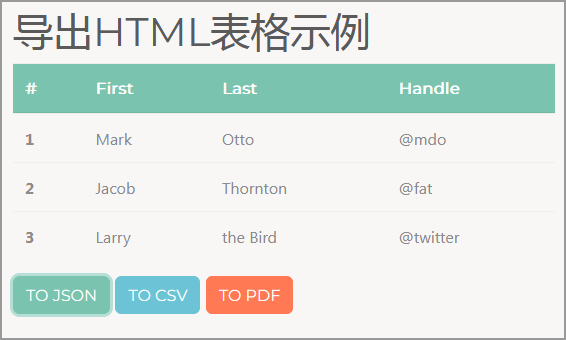
▲Html表格
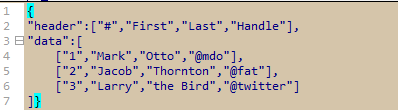
▲導出JSON
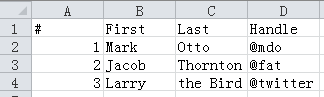
▲導出CSV

▲導出PDF
使用介紹
1、表格HTML
表格設置唯一的ID屬性值,如example。
表頭單元格標簽為th,且設置其scope屬性值為col。
表行單元格標簽為td,每行第一列設置一個scope屬性,值為row。
<table class="table" id="example">
  <thead class="thead-dark">
    <tr>
      <th scope="col">#</th>
      <th scope="col">First</th>
      <th scope="col">Last</th>
      <th scope="col">Handle</th>
    </tr>
  </thead>
  <tbody>
    <tr>
      <td scope="row">1</td>
      <td>Mark</td>
      <td>Otto</td>
      <td>@mdo</td>
    </tr>
    <tr>
      <td scope="row">2</td>
      <td>Jacob</td>
      <td>Thornton</td>
      <td>@fat</td>
    </tr>
    <tr>
      <td scope="row">3</td>
      <td>Larry</td>
      <td>the Bird</td>
      <td>@twitter</td>
    </tr>
  </tbody>
</table>
下面是按鈕標簽的THML代碼。每個按鈕有一個ID值。
<button id="json" class="btn btn-primary">導出JSON</button>
<button id="csv" class="btn btn-info">導出CSV</button>
<button id="pdf" class="btn btn-danger">導出PDF</button>
2、添加js文件
在HTML文檔<body></body>后面添加如下js代碼。
<script src="src/jquery-3.2.1.min.js"></script>
<script src="src/jspdf.min.js"></script>
<script src="src/jspdf.plugin.autotable.min.js"></script>
<script src="src/tableHTMLExport.js"></script>
<script>
  $('#json').on('click',function(){
    $("#example").tableHTMLExport({type:'json',filename:'sample.json'});
  })
  $('#csv').on('click',function(){
    $("#example").tableHTMLExport({type:'csv',filename:'sample.csv'});
  })
  $('#pdf').on('click',function(){
    $("#example").tableHTMLExport({type:'pdf',filename:'sample.pdf'});
  })
</script>
jquery-3.2.1.min.js 是jquery庫文件,放在最前面。
jspdf 和 jspdf.plugin.autotable 是將表格導出PDF的庫文件。
tableHTMLExport.js 是導出文件的JS編程,放在最后面。
jquery代碼中,'#json' 、'#csv' 和 '#pdf' 分別是三個導出按鈕的ID值,這里給它們添加一個點擊事件。而 "#example" 則是表格的ID值。
總結
本文介紹了jQuery將Html表格數據導出為JSON/CSV/TXT/PDF文件的方法,利用了第三方jquery插件,實現起來還是比較容易的。
相關文章
相關文章
x