|
|
|
|
|
|
贊助商
分類(lèi)目錄

贊助商
最新文章
搜索
Linux能Ping通卻訪問(wèn)不了網(wǎng)站,但在服務(wù)器里能wget成功
作者:admin 時(shí)間:2019-2-20 16:21:26 瀏覽:今天配置一臺(tái)Linux服務(wù)器,系統(tǒng)是Centos,配置完畢訪問(wèn)網(wǎng)站時(shí)卻不成功,沒(méi)有什么提示,就是網(wǎng)絡(luò)不通,訪問(wèn)網(wǎng)頁(yè)超時(shí)。
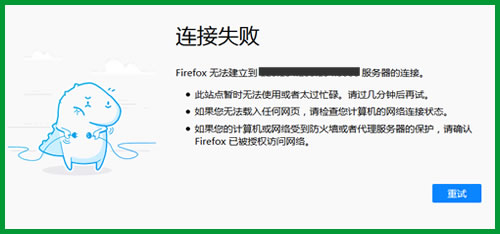
訪問(wèn)網(wǎng)頁(yè)超時(shí)
不過(guò),我在服務(wù)器里用wget命令訪問(wèn)網(wǎng)站時(shí),卻是成功的。
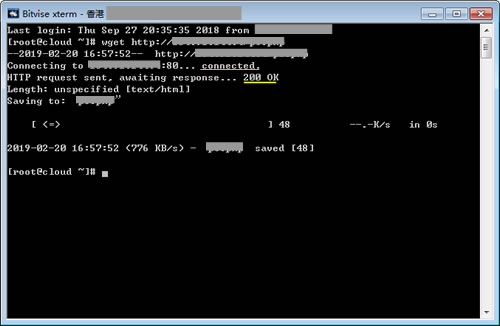
wget命令訪問(wèn)網(wǎng)站成功
也即是說(shuō),外網(wǎng)訪問(wèn)不了網(wǎng)站,服務(wù)器里能訪問(wèn)。
這是什么原因呢?
后來(lái)我問(wèn)了下客服,他叫我關(guān)了防火墻試試,關(guān)閉防火墻的命令是:
iptables stop
我沒(méi)有這樣操作,而是清空iptables規(guī)則,使用命令是:
iptables -F && iptables -X && iptables -Z
我之前更改過(guò)config安全配置文件,位置在:
/etc/selinux/config
使用代碼是:
# This file controls the state of SELinux on the system.
# SELINUX= can take one of these three values:
# enforcing - SELinux security policy is enforced.
# permissive - SELinux prints warnings instead of enforcing.
# disabled - No SELinux policy is loaded.
# SELINUX=enforcing
SELINUX=disabled
# SELINUXTYPE= can take one of these two values:
# targeted - Targeted processes are protected,
# mls - Multi Level Security protection.
SELINUXTYPE=targeted
更改完畢,再訪問(wèn)網(wǎng)站,真的成功了!原來(lái)真是防火墻的問(wèn)題!
知識(shí)擴(kuò)展
如果訪問(wèn)網(wǎng)站遇到提示:No route to host,也很可能是防火墻的問(wèn)題,這時(shí)我們關(guān)閉防火墻一般能解決問(wèn)題。
但是關(guān)閉防火墻不是最好的解決方案,因?yàn)槿绻P(guān)閉了防火墻 ,就會(huì)有危險(xiǎn)了。最好是不關(guān)閉防火墻的情況下就可以訪問(wèn),方法是,添加防火墻規(guī)則,參考文章《【查看/添加/刪除】Linux IPTABLES filter表防火墻規(guī)則的方法》。
標(biāo)簽: linux技術(shù)